Start with
media volume.
See your phone’s playback volume at a glance. If it is muted, a clear message tells you what to adjust first.
 Volume Booster 2027
A little more control over the way you listen. Set your media volume, add extra boost, and find a level that feels right.
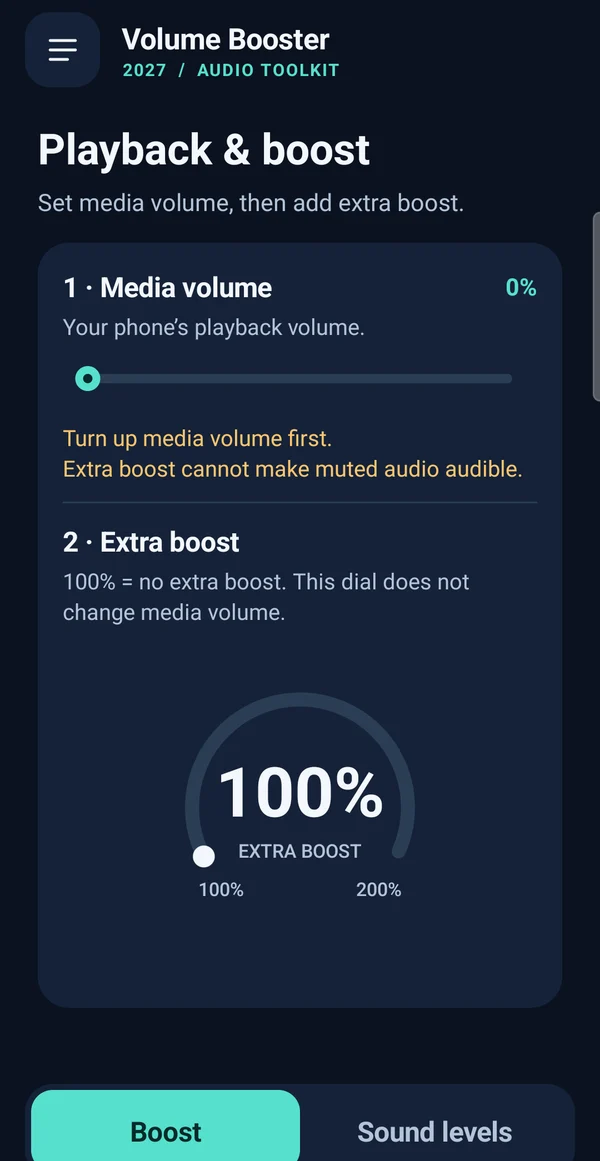
Two distinct controls, clearly explained. Adjust the phone’s playback level first, then choose whether to add amplification.
See your phone’s playback volume at a glance. If it is muted, a clear message tells you what to adjust first.
Turn the 100–200% gain dial to add amplification where supported. 100% applies no extra boost; results vary by device and audio source.
Manage media, ringtone, alarm, notification and system sound levels together. Android controls which adjustments your device allows.
There is no perfect number for every track. Start modestly and adjust only as much as you need.
Start at a low, comfortable level. Extra boost cannot make muted playback audible.
Add a little amplification if you need it. The dial changes gain, not the phone’s media-volume setting.
Reduce gain if the sound becomes distorted. Return the dial to 100% for the original gain level.
Media volume controls your phone’s playback level. The boost dial adds amplification to audio the app can process. A 100% boost setting means no extra amplification, while 0% media volume means muted playback.
The audio toolkit includes an optional home-screen mode with swipe access to controls. Choosing it changes the launcher and app drawer. You can choose “Not now” during setup and change your home app later in Android settings.
No. Amplification depends on the device, Android version, playback app and audio route. Some audio cannot be processed, and the percentage is a gain setting rather than a measurement of how loud it sounds.
In the app, open Preferences → Privacy & permissions. Android manages permission grants. Our privacy policy explains the current app’s data handling and retained optional launcher features.
Tell us your phone model, Android version and what you were trying to do. Please leave passwords and sensitive details out of your message.